

Hello, I’m Veronica
The sky is not completely dark at night. Were the sky absolutely dark, one would not be able to see the silhouette of an object against the sky.


-
ROI-ify Sales
I am off to Dallas again this week to help with a software sales ROI presentation to the executive team. I was browsing some other ROI sites and found Glenn Clowney’s articles particularly interesting. His articles on the topic are right in line with my experience. Among his findings:
- 81% of buyers expect vendors to quantify the business value of their product or service, meaning 60% more projects are likely to be approved (Information Week).
- According to an Ernst & Young study, only 2% of the buyers say vendors are exceeding their expectations for ROI justification during the sales cycle. This means 98% of the time sales professionals miss an opportunity to win the deal.
I hope we fall into that 2%. Keep up the good work Glenn.
-
BPM Adoption Helping Fight Downturn
I love the recent article by this title on CBR online. It quotes Gartner’s Michele Cantara as saying that companies who are prepared to ramp up their BPM investments now will be better poised for growth when the economy recovers. A recent Gartner surveys show spending on BPM is expected to increase by 5% more over the next 12 months. Gartner believes BPM has been a top CIO priority for some years, but that lately its importance has been elevated because BPM projects “act as a catalyst for cutting costs, improving productivity, accelerating business performance and bringing business and IT together.”
Cantra recommended that organizations consider BPM by prioritizing existing projects, and determining how any suspended or new projects should be prioritized, sequenced, funded and staffed for the return of business growth.
I agree. Start with a strong business case and BPM projects become an easy investment to justify. I am currently working to document ROI for two large BPM projects. It looks like the first will have a payoff in less than 6 months and the second even faster. In a time when many companies are deferring IT investments, these two companies are committing to invest in BPM to gain savings and competitive advantage. The business case is too compelling to defer commitment.
-
What Cloud Computing do You Use?
My brother sent me an email the other day asking the above question. As I thought about my reply, I really did not know how to answer him. I think he was asking where I host my business web site, but I use the cloud for such a variety of things today and the offerings continue to grow each day. With that thought in mind, I am posting an updated version of a strategy paper I did a few years ago. This is expanded from an original post by Marc Andreessen. (I miss his excellent blog.)
He suggests that there are three different levels of web “Platforms.” Platforms are: “Any system that can be programmed and therefore customized by outside developers — users — and in that way, adapted to countless needs and niches that the platform’s original developers could not have possibly contemplated, much less had time to accommodate… If you can program it, then it’s a platform.”
I’ve modified his take on the levels to include from web offerings that do not quite meet the “platform” definition to those that go beyond his definition. I will discuss each in more detail:
- Level 0: Stand alone Applications – Applications that run on the web to provide functionality limited to what is coded by the application provider.
- Level 0.5: Mash-ups – Let developers gather web information for publishing to other applications without using a formal API.
- Level 1: Access API – Provide access to functionality using an access protocol such as SOAP. The developer’s application code lives outside the platform and calls into the platform via the API to draw on data and services.
- Level 2: Plug-in API – Lets developers build new functions that are injected, as a “plug in”, to the core system and its user interface. Again, the applications run elsewhere, but functionality displays on the platform via a plug-in API to their interface.
- Level 3: Runtime Platform – Provides a framework for developers to build and run applications on the web. A developer’s application runs online, inside the platform itself.
- Level 4: Infrastructure Services – Provides resources through the web to be used for computing power.
Over the last couple years, these levels have blended and many offerings have components that blur the lines. I think it is still useful for users, developers and platform providers to consider these levels and how they can push offerings to higher levels when appropriate.
0 – Stand Alone Applications:
I talk about this category to demonstrate what a platform is not. Stand alone or Software as a Service (Saas) applications do on the web what desktop apps did in the past. They are used to write a letter, calculate an equation, store files, track time and money, etc. They may have some configuration, but for the most part, they do what the developer told the application to do when it was created. Some of the popular stand alone applications I have used are shown below and there are many, many more.

The interesting thing about stand alone applications on the web is that most of them allow you to work not alone. While the desktop can be a tricky place to share and collaborate, the web naturally lends itself to sharing. So, these applications often allow for multiple users or the ability to invite others to look in or work along side of you. Some exist for the sole purpose of allowing collaboration.Pros:
- Access from anywhere
- Collaborate easily
- Can often upload and download data and docs
- No need to install or support software
Limitations:
- Limited configuration
- Customization & new features only through provider
- No integration capabilities
- If company dies, so does application & potentially data
0.5 – Mash-ups:
I added this category to allow for building platforms that interact without any formal API provided by the platform provider. The applications using this approach run outside the host environment and extract information from the platform application. I put REST and RSS in this category because they don’t require coding by the provider to expose and share information. Screen scraping is another technology widely used when formal API’s don’t allow information sharing. Applications and development environments to streamline creation of secondary applications using these approaches take advantage of these techniques.
more after the break> (more…)
-
Does the Cloud Role?
Cloud computing has been held up as the next great leap organizations should take. Yet, I see few using these offerings for other than standard applications, pre-built features and some non-critical and departmental applications. Customized enterprise applications and those that offer competitive advantage are rarely built in the cloud today.
The draw of the cloud are many. In George Reese’s book, Cloud Application Architectures published this April, he draws the following comparisons:

From this, he concludes:
The one obvious fact that should jump out of this chart is that building an IT infrastructure from scratch no longer makes any sense. The only companies that should have an internal IT are organizations with a significant preexisting investment in internal IT or with regulatory requirements that prevent data storage in third-party environments.
Everyone else should be using a managed services provider or the cloud.
And, after more analysis:
If we exclude sunk costs, the right managed services option and cloud computing are always financially more attractive than managing your own IT.
If you have an application that you know has to be available 24/7/365, and even 1 minute of downtime in a year is entirely unacceptable, you almost certainly want to opt for a managed services environment and not concern yourself too much with the cost differences (they may even favor the managed services provider in that scenario).
On the other hand, if you want to get high-availability on the cheap, and 99.995% is good enough, you can’t beat the cloud.
Certainly, 99.995% availability is greater than most internal or even managed service organizations achieve. So, what will it take for enterprise IT to fully embrace the cloud as a development architecture? Let’s look at a few counter points to Reese’s analysis that cause friction.
Many organizations see the perpetuity cost model as unfavorable. While total cost of ownership within the first 3 or 4 years usually wins for the cloud, many organizations don’t like the longer-term analysis that often favors traditional models. Accounting rules also penalize pay as you go models.
Security concerns and concerns over the cloud provider’s reliability and viability make enterprises uncomfortable with relinquishing control of their critical data and unique functionality even if permissible by regulations. Examples show that data privacy may be at risk. Data can be lost. Downtime can be unexpected and prolonged. While all of these are possible with other architectures, the perception is that they are greater in the cloud. And, if a provider does go away, the entire infrastructure could need to be recreated quickly at very high costs.
Reese skirts perhaps the biggest issue – sunk costs. He mentions this from a financial perspective, but the sunk costs are many and are hard to over come. Enterprises have sunk costs in terms of legacy software, legacy data, legacy skill sets and existing infrastructure. Many enterprises start with packaged applications which do not fit well into the cloud as the basis for their customized offerings. Even if package conversion was easy, enterprise applications typically have many custom features that need to be re-recreated for the cloud. Organizations also often need to convert their existing data to new formats to use these applications. Cloud architectures are poorly understood and few resources know how to work with them when creating applications. New skills are needed, even if by fewer resources, to manage, configure and customize cloud applications. These are in addition the the main sunk cost: using still available, depreciated assets can be too enticing to make the leap.
The cloud will one day be a force for enterprise IT. Early adopters have show benefits with non-critical applications and we see many examples of architectures taking the first steps by exposing and utilizing web service API’s to extend offerings. Many start-ups have benefited from the low entry costs for building new businesses. But, it seems to me, that until the benefits become more magnified, or the counter points to cloud architectures are minimized, larger-scale enterprise adoption will be slow for core applications. Someday, everyone may program in the cloud, but the friction that exists today pushes that date further into the future.
-
What is SharePoint
I hear many businesses that are interested in ‘doing something with SharePoint.’ That is kind of like saying I’d like to deploy a Swiss army knife. Depending on what the goals of the business are, SharePoint can be a lot of different things. This post tries to explore what those are.
First, let’s start with a few definitions for SharePoint:
An integrated suite of server capabilities that can help improve organizational effectiveness by providing comprehensive content management and enterprise search, accelerating shared business processes, and facilitating information-sharing across boundaries for better business insight. Additionally, this collaboration and content management server provides IT professionals and developers with the platform and tools they need for server administration, application extensibility, and interoperability.
-Microsoft www.microsoft.com/sharepoint/prodinfo/what.mspxWow that’s a mouth full. And Microsoft has been working to simplify this over the past few years. What about Wikipedia – surely they have a simple definition:
A collection of products and software elements that includes, amongst a growing selection of components, collaboration functions, process management modules, search modules and a document-management platform. SharePoint can be used to host web sites that access shared workspaces, information stores and documents, as well as host defined applications such as wikis and blogs. All users can manipulate proprietary controls called “web parts” or interact with pieces of content such as lists and document libraries.
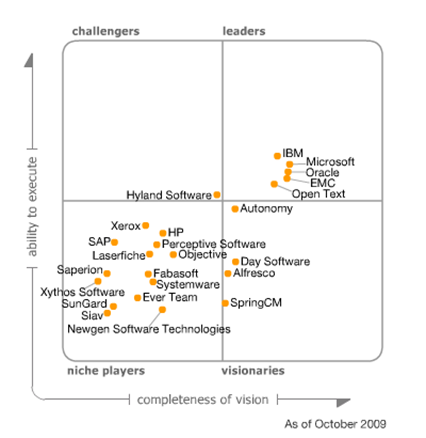
– Wikipedia en.wikipedia.org/wiki/SharepointOK, still a lot to digest. Let’s look at each of the components that make up this beast in a little more detail before drawing any conclusions. Acknowledgements to Gartner for the included magic quadrant analysis…
Enterprise Content Management:
Allows the management of an organization’s unstructured information (content and documents related to organizational processes) wherever that information exists. It includes technologies to:
- Capture (OCR, email, video, etc.)
- Manage
- Document management (check in/out, versioning)
- Collaboration (or collaborative software, groupware),
- Web content management
- Records management (indexing, archive and filing management)
- Workflow (capture, reviews, approvals, publishing, expiration)
- Store (repositories, libraries, media)
- Deliver (transform, secure, distribute)
- Preserve (backup, recovery)
While I often hear that SharePoint is difficult to use toward this goal, especially if the primary objective is web content management, it has the features to address all these needs. Gartner’s ranking bears this out.
More after the break…




About Me
The sky is not completely dark at night. Were the sky absolutely dark, one would not be able to see the silhouette of an object against the sky.
Follow Me On
Subscribe To My Newsletter
Subscribe for new travel stories and exclusive content.
 Horizon Line Group